
A schema validator is a tool that checks the structured data on a web page for mistakes. Structured data is code, often written in JSON-LD, that tells search engines what a page is about: an article, a product, a local business and so on. A validator reads that code and reports problems such as syntax errors, wrong types and missing properties.

The phrase “schema validator” also appears outside SEO. Developers use it for XML Schema, database schemas and code libraries. This guide covers one meaning: validating structured data on websites. It also explains JSON Schema, because people often mix it up with Schema.org markup.
You will learn which tools check which things, how to test your markup step by step, how to read errors, and why a clean result does not guarantee anything in search.
What Is a Schema Validator?
Schema validation means checking structured data against a set of rules. For website markup, those rules come from three places, and they are not the same:
- Syntax rules. Is the code written correctly? A missing comma in JSON-LD is a syntax problem.
- Vocabulary rules. Does the markup use Schema.org types and properties correctly? A misspelled type is a vocabulary problem.
- Search feature rules. Does the markup meet what a search engine needs for a specific feature? Google, for example, publishes its own requirements for features it supports.
A tool may check one, two or all three. That is why two tools can give different results for the same markup, and why neither one is wrong. Developers use validators to catch mistakes before launch, and SEO professionals use them to check pages after changes.
Here is a small example of the kind of markup a validator reads:
json
{
  "@context": "https://schema.org",
  "@type": "Organization",
  "name": "Example Shop",
  "url": "https://www.example.com/"
}
This says the page describes an organization with a name and a website. Schema.org is the shared vocabulary behind those words. JSON-LD is one way to write it. Microdata and RDFa are other ways.
How Does a Schema Validator Work?
The exact steps depend on the tool, but most follow the same pattern:
- You enter a page URL or paste a code snippet, depending on what the tool accepts.
- The tool reads the structured data it can find.
- It checks syntax, vocabulary or search feature rules, depending on its purpose.
- It reports errors, warnings or unrecognized items.
- You review the messages and decide what needs to change.
- You fix the markup and test again.
When a tool tests a URL, it fetches the page. When it tests a snippet, it checks only the code you paste. Those two results can differ. A snippet can look fine while the live page contains a different or broken version. Step six of the later checklist covers this.
Schema Validator Tools
Different tools answer different questions. Pick the one that matches your question.
Schema Markup Validator
The Schema Markup Validator is the general purpose tool for Schema.org markup. It is hosted by Schema.org and takes over the general checking role of Google’s older Structured Data Testing Tool. Its documentation says it can extract JSON-LD, RDFa and Microdata, display a summary of the data it finds, and identify syntax mistakes.
It can test a URL or code you provide, and it can read structured data added by JavaScript. Its focus is Schema.org, so it does not tell you whether Google supports a feature for your markup. Use it when you want to know whether your markup is well formed and uses Schema.org correctly, whatever search engine reads it.
Google Rich Results Test
People who search for a schema validator Google offers usually want the Rich Results Test. It checks structured data against what Google needs for the rich result features it supports. Google’s own documentation recommends validating code with this test and fixing critical errors, and it also notes that some problems are not syntax problems and that the test may not catch them.
Use it when your question is whether a page is eligible for a Google rich result type. Because it only covers types Google supports, a clean result does not tell you whether all your Schema.org markup is correct. Check the tool itself for the inputs it currently accepts.
Google Search Console
Search Console is not a one time tester. It monitors your site after Google has found your pages. Its rich result reports show the structured data Google found and whether it is valid, with a separate report for each type of rich result. According to Google, rich result reports count items, not pages, and valid items are eligible to appear as rich results.
Use it after launch and after site changes to spot invalid items across many pages. Reports only appear for types Google tracks, and data takes time to update. To investigate one page, the URL Inspection tool and the Rich Results Test are usually more direct.
Online JSON and JSON Schema Validators
A plain JSON validator checks that JSON is written correctly: matching brackets, quotes and commas. Someone who searches for a schema validator JSON tool may only need this. It is useful when JSON-LD fails before any vocabulary check can run.
JSON Schema is a different thing. It is a language for describing what a JSON document should look like, and a JSON Schema validator checks data against that description. It does not check whether your markup uses Schema.org types and properties correctly. Do not use it as a replacement for the Schema Markup Validator.
Schema Validator Browser Extensions
A schema validator extension can show the structured data on a page while you browse, which is handy for quick checks on live pages. They are convenient and they are not official tools, and results may differ from the Schema Markup Validator or Google’s tests.
Before installing one, check who publishes it, what permissions it asks for, when it was last updated and what reviews say. Confirm anything important in an official tool. I did not verify any specific extension for this article.
Schema Validator vs Google Rich Results Test
| Factor | Schema Markup Validator | Google Rich Results Test |
|---|---|---|
| Main purpose | Check general Schema.org markup | Check eligibility for Google supported rich results |
| Type of validation | Syntax and Schema.org vocabulary | Google’s requirements for supported features |
| Typical input | URL or code snippet | URL or code snippet |
| Issues reported | Syntax mistakes and unusual markup | Errors and warnings for supported types |
| SEO use | Confirm markup is well formed and meaningful | Check Google feature eligibility |
| Limitations | Does not test Google feature requirements | Only covers types Google supports |
They are not interchangeable. A page can pass the Schema Markup Validator and still fail Google’s requirements for a feature, because it can lack a property Google wants. The reverse can also happen when you use a valid Schema.org type that Google does not use for rich results.
How to Validate Schema Markup on a Website
Choose the Correct Validation Tool
Decide what you need to know first:
- Is my JSON written correctly? Use a JSON validator.
- Does my markup use Schema.org correctly? Use the Schema Markup Validator.
- Can Google use this page for a rich result? Use the Rich Results Test.
- Are there invalid items across my site? Use Search Console.
Enter a URL or Code Snippet
Use a URL to test the published page and a snippet to test code before it goes live. Tools differ in what they accept, so check the options on the tool you use. A tool that tests a URL can only see what the server returns to it, which matters if your page is behind a login or blocks crawlers.
Review Errors and Warnings
Read each message. An error usually means something is broken or missing. A warning often means something is missing or unusual, but not always blocking. What counts as an error, a warning or fine depends on the tool and the schema type. A Google requirement is not the same as a Schema.org rule, so never treat every warning as a failure or ignore all of them.
Correct the Markup
Find the exact property, type or value mentioned. Check spelling and case, since schema property names are case sensitive. Compare your values with the type definition on Schema.org or Google’s documentation. Change one thing at a time when you can, so you know what fixed the problem.
Test the Corrected Markup Again
Run the same tool again after each fix. A fix can reveal a second problem the first error hid, especially with JSON syntax errors that stop a tool from reading anything past them.
Check the Live Website
Test the published URL after deployment, not only your snippet. Confirm that the markup is present, matches the visible page and survives template or plugin changes. If markup is added by JavaScript, check what a tool actually sees. Pages built with some JavaScript frameworks need extra care, and our guide to web development frameworks explains how those choices can affect what is in the page.
Common Schema Validation Errors and How to Fix Them
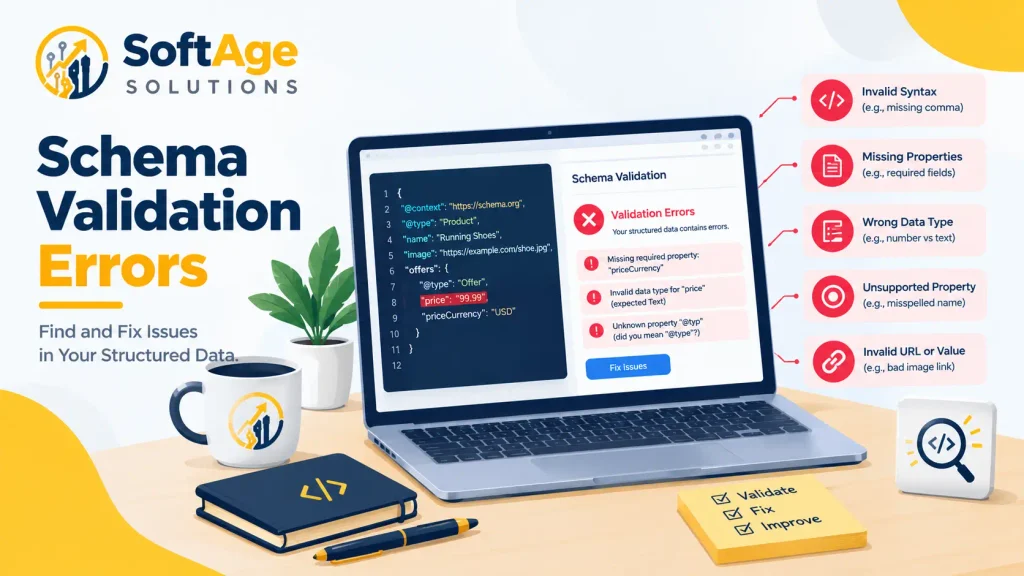
Here is a small example with three mistakes:
json
{
  "@context": "https://schema.org",
  "@type": "Organisation",
  "name": "Example Shop"
  "url": "www.example.com"
}
The problems: the type is misspelled (Schema.org uses “Organization”), a comma is missing after the name, and the URL has no protocol. Here is the corrected version:
json
{
  "@context": "https://schema.org",
  "@type": "Organization",
  "name": "Example Shop",
  "url": "https://www.example.com/"
}
Exact messages vary by tool, so read what your tool reports instead of looking for fixed wording.
| Problem | What it looks like | How to fix it |
|---|---|---|
| Invalid JSON syntax | Missing comma, bracket or quotation mark | Fix the punctuation and test again |
| Missing property | A property a feature needs is absent | Check the type’s documentation and add it if it applies |
| Wrong data type | Text where a number or object is expected | Change the value to the expected type |
| Invalid value | A date written as “12th Oct” instead of 2026-10-12 | Use the format the property expects |
| Wrong schema type | A type that does not fit the page | Choose the type that describes the page |
| Misspelled property | A property name with the wrong spelling or case | Compare with the Schema.org definition |
| Invalid URL | A link missing “https://” or a broken path | Use a full, working URL |
| Wrong nesting | An object placed in the wrong parent | Match the structure the type expects |
| Mismatch with the page | Markup says one thing, the page shows another | Make the markup reflect visible content |
| Duplicate or conflicting markup | Two plugins both add the same type | Keep one source and remove the extra |
Remember that required properties differ by feature. A property that is optional for Schema.org can be required for a Google rich result type.
Common Schema Types You May Need to Validate
Use only the types that describe the actual page. Adding markup because a feature looks attractive is a mistake if the page does not qualify.
| Type | Common use | Note |
|---|---|---|
| Organization | Company details on a home or about page | Keep name, URL and logo accurate |
| LocalBusiness | A business with a physical location | Address and hours must match the page. See our local SEO service |
| Product and Offer | Product pages in a store | Price and availability must match what shoppers see |
| Article | News or blog posts | Dates and author details should be accurate |
| BreadcrumbList | Page path on a site | Match the visible breadcrumb trail |
Schema.org has many more types than Google uses for rich results. Support for features changes over time, so check Google’s current documentation before planning around a specific result.
Why Schema Validation Matters for Technical SEO
Structured data helps search engines read specific facts on a page. Validation helps you confirm that those facts are written correctly. It gives you a way to:
- Catch markup mistakes before and after launch.
- Check eligibility for features a search engine supports.
- Debug markup after a template, plugin or theme change.
- Add a repeatable step to a technical SEO review.
Validation is one part of technical SEO, alongside crawling, indexing, page speed and site structure. It does not replace a full audit. Valid markup does not guarantee rankings, indexing or a rich result. Google says it does not guarantee that features using structured data will appear in results.
Other work still matters too. The content on the page should be strong, which is where on page SEO and good content writing come in, and links from other sites are part of off page SEO.

Schema Validator Best Practices
- Pick the tool for the question. Syntax, vocabulary and Google eligibility are separate checks.
- Use official documentation. Schema.org and Google Search Central define the rules.
- Validate after implementation. Do not wait for problems to appear.
- Retest after changes. Template, plugin, theme and CMS updates can change markup.
- Match visible content. Markup should describe what users can see on the page.
- Check the live page. A clean snippet does not prove the published page is correct.
- Read warnings. Do not ignore them all, and do not treat them all as emergencies.
- Monitor Search Console. Check available reports after launch and after major changes.
- Make it routine. Add schema checks to your regular technical review.
How to Choose the Right Schema Validator
No single validator is best for every task. Match the tool to the job.
| If you want to… | Consider |
|---|---|
| Check that JSON is written correctly | A JSON validator |
| Check JSON against a defined structure | A JSON Schema validator |
| Check Schema.org markup in any format | The Schema Markup Validator |
| Check Google rich result eligibility | The Google Rich Results Test |
| Monitor many pages over time | Google Search Console |
| Inspect markup quickly while browsing | A browser extension, confirmed in an official tool |
Also consider which formats the tool accepts, whether it takes URLs and code, how clear its messages are, and whether it is maintained and documented. A developer may use several tools. A website owner may only need one or two.
How SoftAge Solutions Can Help With Technical SEO
SoftAge Solutions is an IT company that offers SEO and digital services. Its technical SEO service includes structured data (schema markup) alongside audits, crawlability, speed and mobile checks. Its web development service covers the site itself, which matters when markup comes from templates and code. Teams planning something unusual can read our guide to custom web development.
If your markup is generated by a theme, plugin or custom code, a review can show where errors come from and how to fix them at the source. We make no promises about rankings or rich results, because those depend on search engine rules and many other factors.
FAQs
What is a schema validator?
It is a tool that checks structured data on a web page for errors. Depending on the tool, it checks syntax, Schema.org vocabulary, or search engine feature requirements.
What is the best schema validator for SEO?
There is no single best one. The Schema Markup Validator suits general Schema.org checks, and Google’s Rich Results Test suits Google feature eligibility. Many people use both.
How do I validate schema markup?
Choose a tool, enter a URL or paste your code, read the errors and warnings, fix the markup and test again. Then check the live page.
What is the difference between Schema.org and JSON Schema?
Schema.org is a vocabulary for describing things like organizations and products. JSON Schema is a language for describing what a JSON document should look like. They solve different problems.
Is the Schema Markup Validator the same as Google’s Rich Results Test?
No. The first checks general Schema.org markup. The second checks eligibility for Google supported rich results.
Can I validate schema online for free?
The official tools from Schema.org and Google are available online. Check each tool for its current access and limits before you rely on it.
How do I test JSON-LD?
Paste the code into a tool that accepts snippets, or test the page URL. If the tool cannot read the code at all, check for JSON syntax mistakes first.
What causes schema validation errors?
Common causes include JSON syntax mistakes, missing or misspelled properties, wrong value types, invalid URLs or dates, wrong types and duplicate markup from plugins.
Does valid schema guarantee rich results?
No. Valid markup may make a page eligible for a feature, but Google decides whether to show it.
Can a schema validator detect every SEO problem?
No. It checks structured data only. Crawling, indexing, speed, content quality and links need separate checks.
How often should I test structured data?
Test after you add or change markup, and after theme, plugin, template or site changes. Check Search Console reports regularly where they are available.
Conclusion
A schema validator helps you inspect structured data, find mistakes and compare markup against specific rules. The key point is that these rules are not the same. Valid JSON is not the same as correct Schema.org markup, and correct Schema.org markup is not the same as eligibility for a Google rich result.
Use the tool that matches your question, check the live page, retest after changes and treat validation as one step in your wider technical SEO work.
Want help checking or implementing structured data on your website? Contact SoftAge Solutions to discuss your website requirements and a suitable technical SEO approach.