
Ecommerce web development is the process of building and maintaining an online store. It covers the pages customers see, the systems that handle carts, orders and payments, and the connections to shipping, inventory and marketing tools.
A store that loads slowly on a phone, confuses people at checkout or shows the wrong stock count can lose sales. A store that is planned well makes buying simple and makes running the business easier. This guide explains how ecommerce website development works, which features and technologies matter, how to compare platforms, what affects cost and timelines, and how to choose a development partner. Technical terms are explained in plain language.
What Is Ecommerce Web Development?
Ecommerce web development means designing, building, testing and maintaining a website where customers can buy products or services online. Developers write the code that shows products, runs the shopping cart, takes payments, saves orders and sends confirmation emails.
Picture a small outdoor gear shop that wants to sell online. Customers need to browse tents by size and price, pick a color, add the tent to a cart, pay by card and get a tracking number. Behind the scenes, the shop needs the stock count to drop, the order to appear in a dashboard and a shipping label to be created. Ecommerce web development connects all of those steps.
Ecommerce Web Development vs Ecommerce Web Design
Design decides how the store looks and feels. That includes layout, colors, product page structure, buttons and menu structure. Development makes the store work. That includes the code, the database and the payment connections.
In practice, the two overlap. A checkout page needs a clear layout and correct code. Results are usually better when designers and developers work from the same written requirements.
How the Parts Work Together
- Frontend: the part customers see and click in the browser.
- Backend: server code that applies business rules, checks logins and processes orders.
- Database: storage for products, prices, customers and orders.
- Payments: a payment gateway or provider that handles card details.
- Integrations: connections to shipping, tax, email, accounting or inventory tools.
Ecommerce Web Development for Businesses
A well planned online store can help a business in several practical ways:
- Show products and services to customers outside a shop’s local area.
- Accept orders and payments at any hour.
- Keep product details and stock information in one place.
- Give customers order tracking and a simple way to ask for support.
- Connect to marketing, accounting and shipping tools.
- Collect sales and traffic information that the team can review.
None of this happens automatically. A store does not guarantee sales or growth on its own. Results depend on the product, the price, the market, the customer experience and the marketing behind the store.
Types of Ecommerce Websites
The business model affects which features you need.
| Type | What it means | Simple example |
|---|---|---|
| B2C | A business sells to individual shoppers | A clothing retailer’s online store |
| B2B | A business sells to other businesses, often with bulk orders or account pricing | A parts supplier with a login for trade customers |
| C2C | Individuals sell to each other through a platform | A resale marketplace |
| DTC (direct to consumer) | A brand sells its own products without a retailer in between | A skincare brand with its own store |
| Subscription | Customers receive products on a repeating schedule | A monthly coffee delivery |
| Multi vendor marketplace | Many sellers list products on one site | A platform where independent shops sell side by side |
Most small businesses start with B2C or DTC. A marketplace or subscription model adds complexity, so choose it only when your business plan needs it.
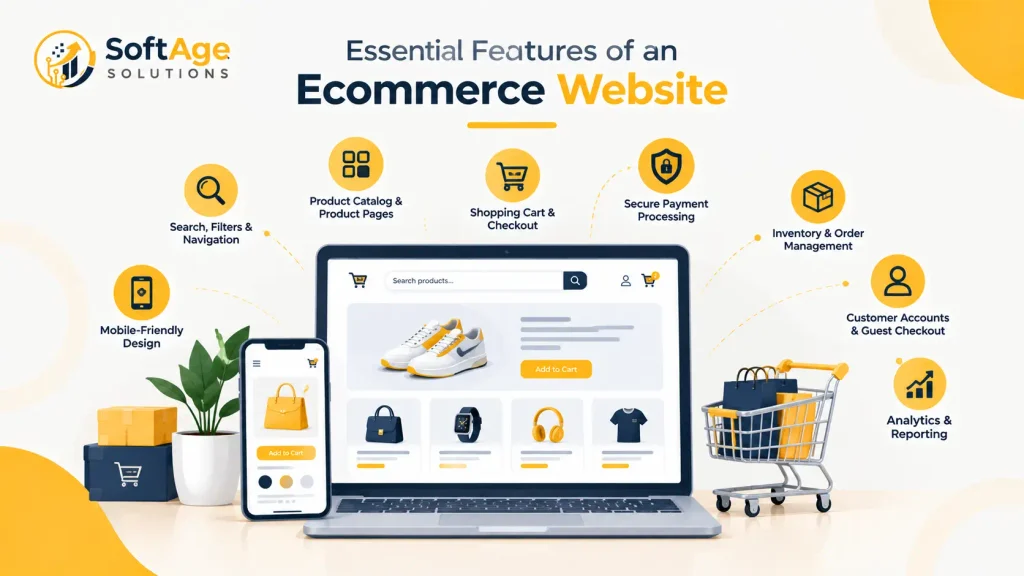
Essential Features of an Ecommerce Website
Not every store needs every feature. Start with what your customers and your team need to complete an order.
Product Catalog and Product Pages
Each product page should show clear images, a useful product description, price, variants such as size or color, and availability. Good product information helps shoppers decide and reduces questions sent to support. Strong content writing matters here, because developers can build the page but someone has to write helpful copy for it.
Shopping Cart and Checkout
The cart should let customers change quantities, see shipping and tax details early and move to payment easily. Long forms, forced account creation and surprise fees are common reasons shoppers leave. Keep the number of steps as small as your business allows.
Secure Payment Processing
Online payments usually go through a payment gateway or provider. These services handle card details so your own servers handle as little sensitive data as possible. Review your security and compliance duties before launch. The security section below covers this.
Inventory and Order Management
Stock counts, order status, shipping and returns often connect to the store. For a shop with a physical location, inventory should match across channels, or customers may order items that are not available.
Customer Accounts and Guest Checkout
Accounts let customers see past orders and save addresses. Guest checkout lets first time buyers pay without registering. Many stores offer both. A B2B store may need accounts for pricing and approvals, while a store with simple one time purchases may lean on guest checkout.
Search, Filters and Navigation
Shoppers need a quick way to find products. Product search, category pages and filters for price, size or brand support this. Clear menu structure also helps search engines understand how products relate to each other.
Mobile Friendly Design
Customers shop on phones, tablets and desktop screens. A responsive layout adjusts to each screen size. Test real tasks on real devices: searching, choosing a variant, entering an address and paying.
Analytics and Reporting
Analytics tools show traffic sources, popular products and where shoppers leave. Choose tools that fit your privacy policy and local privacy rules, and decide which numbers the team will actually review.
Technologies Used in Ecommerce Web Development
The right technology depends on the project. No single stack is best for every store.
Frontend Technologies
HTML structures the page, CSS controls its appearance and JavaScript adds interaction such as image galleries and cart updates. Many teams also use a JavaScript library or framework. Our guide to web development frameworks explains how they differ and how to choose one.
Backend Technologies
The backend runs on a server. It checks logins, calculates totals, applies discount codes, records orders and talks to other systems. Developers can write it in languages such as PHP, Python, Java or JavaScript, often with a framework. The choice usually depends on the platform and the team’s skills.
Databases and Data Management
A database stores products, customers, orders and stock levels. Good data design makes reports and searches faster and reduces errors. Plan how to handle customer data carefully, including who can see it and how long you keep it.
APIs and Third Party Integrations
An API is a set of rules that lets one system talk to another. Ecommerce stores commonly connect to:
- Payment providers
- Shipping carriers
- Tax calculation tools
- Email and marketing tools
- A CRM (customer relationship management) system
- An ERP (enterprise resource planning) or inventory system
Every connection adds value and also adds something to maintain, so add only what the business uses.
Hosting, Performance and Security
Hosting decides where the store runs. Options include a hosted platform where the provider manages servers, or cloud hosting that your team or developer manages. Ask who is responsible for uptime, backups, software updates and performance monitoring.
Popular Ecommerce Platforms
A platform is the base system for your store. Plans, features and pricing change often, so confirm details on each vendor’s official site before deciding.
| Platform | General type | Often considered when | Check before choosing |
|---|---|---|---|
| Shopify | Hosted platform | You want a faster setup and less server management | Customization limits, app costs, transaction fees |
| WooCommerce | Open source plugin for WordPress, self hosted | You already use WordPress and want more control | Hosting, updates, security and plugin quality |
| Adobe Commerce (formerly Magento) | Commerce platform for larger or complex needs | You have a large catalog or complex requirements | Developer skills, hosting and maintenance effort |
| BigCommerce | Hosted platform | You want a hosted setup with strong API options | Plan limits, features included and integrations |
| Custom built | Built for your requirements | Your process does not fit standard platforms | Cost, timeline and long term maintenance |
A hosted platform means the provider runs the servers and applies many updates. A self hosted platform means your team or developer handles hosting, security patches and backups. That is the core trade off between convenience and control.
Headless commerce separates the customer facing frontend from the commerce engine in the backend, and connects them with APIs. It gives teams more design freedom and more complexity. It is not required for most small stores.
No platform is best for every business. Match the platform to your catalog size, team skills, budget and plans.
Custom Ecommerce Development vs Ready Made Platforms
| Factor | Ready made platform | Custom development |
|---|---|---|
| Setup effort | Usually lower | Usually higher |
| Setup time | Often shorter | Often longer |
| Customization | Limited to platform options and apps | Built around your requirements |
| Technical control | Shared with the platform | Higher |
| Maintenance | Platform handles some updates | Your team or developer handles most |
| Integrations | Depends on available apps and APIs | Built to fit your systems |
| Long term cost | Subscription, app and fee costs add up | Higher build cost, plus maintenance |
Choose by your needs. A store with a standard catalog and checkout may do well on a ready made platform. A business with unusual pricing, workflows or system connections may need custom work. Our article on custom web development covers when that approach makes sense.
Ecommerce Web Development Process
The steps vary with project size, but most projects follow this order.
- Business and audience research. Define who you sell to and what they expect.
- Requirements gathering. List features, integrations, payment methods and shipping rules.
- Platform and technology selection. Pick the approach that fits the requirements.
- Site structure planning. Map categories, product pages and key flows.
- UI and UX design. Design pages for desktop and mobile, with checkout in mind.
- Frontend and backend development. Build the pages and the server logic.
- Integrations. Connect payments, shipping, tax, email and inventory.
- Security and performance checks. Review access, updates, backups and page speed.
- Ecommerce SEO setup. Check URLs, titles, structured data and redirects.
- Testing. Test orders, payments, emails, refunds and mobile screens.
- Launch preparation. Prepare content, redirects, tracking and a rollback plan.
- Monitoring and maintenance. Watch errors, updates and customer feedback after launch.
Role of SEO in Ecommerce Website Development

SEO works best when planned during development, because many choices affect how search engines read the site. Fixing structure after launch costs more and takes longer. Work on technical SEO covers crawling, indexing and site structure, and on page SEO covers titles, headings and page content.
Points to plan for:
- Site structure and URLs. Use clear category paths and readable product URLs.
- Product and category pages. Give each page a unique title, description and useful text.
- Images. Use clear file names, sensible sizes and descriptive alt text.
- Internal links. Link related products and categories with normal crawlable links.
- Duplicate content. Filters, sorting and product variants can create many similar URLs. Canonical tags tell search engines which version to prefer.
- XML sitemap. List the pages you want search engines to find.
- Redirects. When replacing an old store, redirect old addresses to the right new pages.
- Mobile usability and speed. Core Web Vitals are Google’s measures of loading, responsiveness and visual stability. Heavy scripts and large images often hurt them.
- Structured data. Product markup helps search engines understand price, availability and reviews. Google explains how this works in its Product structured data documentation, including that it can make product information appear in richer search results and that adding a Merchant Center feed alongside page markup gives more eligibility. Markup improves eligibility and does not guarantee a result.
SEO is ongoing. A store also needs fresh content, links from other sites and, for businesses with physical locations, local SEO and off page SEO work after launch. No setup promises a ranking.
Ecommerce Website Security and Customer Trust
Shoppers share names, addresses and payment details. Protecting that data is part of the build, not an extra.
- HTTPS. It encrypts the connection between the browser and your site. It is necessary, and it does not make a store fully secure on its own.
- Payment providers. Hosted payment pages or provider tools can reduce how much card data your own systems touch. They do not remove a merchant’s responsibilities.
- PCI DSS. This is the payment card data security standard. The PCI Security Standards Council publishes the standard and ecommerce guidance. Your obligations depend on how you accept payments, so confirm them with your payment provider or a qualified advisor.
- Access control. Limit admin accounts, use strong passwords and use extra login steps where available.
- Updates. Keep the platform, themes, plugins and server software current.
- Backups. Keep regular backups and test that you can restore them.
- Fraud prevention. Use the screening tools your payment provider offers.
- Privacy. Publish clear privacy notices and handle data as required where your customers live. This article is not legal advice.
- Clear policies. Show shipping, return and refund terms where shoppers can find them before they buy.
Ecommerce Web Development Cost
There is no single price. Cost depends on project scope and on choices made early. Main factors:
- Number of products and categories
- Platform choice and its plan or hosting costs
- Custom features and design requirements
- Payment, shipping and other integrations
- Moving products and customers from an existing store
- Security requirements
- Content preparation, such as photos and descriptions
- Testing and fixes
- Ongoing maintenance and support
Ask for itemized quotes so you can see what is included. Separate one time build costs from recurring costs such as hosting, subscriptions, payment fees and maintenance. A low build price can lead to high later costs if maintenance is not planned.
How Long Does It Take to Build an Ecommerce Website?
No timeline fits every project. A small store on a ready made platform usually takes less time than a custom build with many integrations, but the real timeline depends on:
- Project size and number of products
- Design complexity
- Custom functionality
- Third party integrations
- How ready your content is
- How fast your team gives approvals
- Testing and revision rounds
Ask a developer for a timeline tied to written scope. Delays often come from missing content and slow decisions, so prepare product data and images early.
Common Ecommerce Web Development Mistakes
- Picking a platform before listing requirements. Write requirements first, then compare platforms.
- Treating mobile as an afterthought. Test every key task on a phone.
- Making checkout long. Remove steps that do not serve the order.
- Weak product descriptions. Write for customer questions, not only for search engines.
- Skipping security basics. Plan updates, backups, access control and payment security early.
- Leaving SEO for later. Plan URLs, filters and redirects during the build.
- Adding too many plugins or apps. Each one adds maintenance, speed cost and security risk.
- Not testing real orders. Test payments, refunds, emails and stock changes before launch.
- Ignoring accessibility. Check keyboard use, contrast and clear form labels.
- Underestimating maintenance. Budget for updates and support after launch.
- Forgetting fulfillment. Plan stock, shipping and returns, not only the website.
- Skipping analytics and privacy planning. Decide what you track and how you protect it.
How to Choose an Ecommerce Web Development Company
Ask potential providers about:
- Relevant experience. Have they built stores like yours? Ask for examples you can verify.
- Understanding of your business. Do their questions focus on your customers and operations?
- Platform and technical skills. Can they explain why they recommend one approach over another?
- Communication and planning. Ask for a written scope, milestones and who your contact is.
- Integration experience. Ask about the payment, shipping and inventory tools you use.
- Testing. Ask how they test orders, payments and mobile screens.
- Security practices. Ask how they handle updates, access and backups.
- Support after launch. Ask what maintenance covers and what costs extra.
- Ownership. Confirm that you will own your accounts, content and code, and ask what you receive at handover.
Be cautious about firms that promise guaranteed sales, rankings or revenue. No developer controls those outcomes.
How SoftAge Solutions Helps With Ecommerce Web Development
SoftAge Solutions is an IT company that offers SEO and digital services, including web development, content writing and SEO work. For an online store, that means the website build and the search visibility planning can be discussed together.
A useful first step is clarifying your requirements: what you sell, how customers will pay, which systems the store must connect to and how you plan to maintain it. Specific platforms and project scope should be confirmed in that conversation. We do not make promises about sales, rankings or traffic, because those depend on your market, your products and ongoing work.
FAQs
What is ecommerce web development?
It is the process of designing, building and maintaining a website where customers can buy products or services online. It covers the storefront, the cart and checkout, payments, order handling and connections to other business tools.
What is the difference between ecommerce design and development?
Design covers how the store looks and how shoppers move through it. Development covers the code and systems that make it work. Good projects treat the two as one plan.
Which ecommerce platform is suitable for a small business?
It depends on your catalog, budget, team and plans. Hosted platforms often suit businesses that want a faster setup, while a WordPress based plugin can suit a business already on WordPress. Compare options against written requirements and check current plans on each vendor’s site.
How much does ecommerce web development cost?
Cost varies with scope, platform, custom features, integrations and ongoing support. Ask for itemized quotes that separate build costs from recurring costs.
How long does it take to build an online store?
It depends on size, design, products, integrations and how quickly content and approvals arrive. A developer should give a timeline based on written scope.
What technologies are used for ecommerce development?
Common parts include HTML, CSS, JavaScript, a backend language, a database, APIs, hosting and a platform or content management system. Choice depends on the project and the team.
Is custom ecommerce development better than Shopify or WooCommerce?
Not always. A ready made platform often fits standard stores. Custom development can fit unusual workflows or system connections, with higher cost and more maintenance.
What features does an ecommerce website need?
At minimum: product pages, a cart, checkout, secure payment, order management and mobile friendly design. Search, filters, accounts, reviews and analytics are common additions, depending on the business.
How do I make an ecommerce website secure?
Use HTTPS, a reputable payment provider, limited admin access, regular updates and tested backups. Review payment card requirements with your provider. No single step makes a store fully secure.
Does ecommerce web development include SEO?
Basic technical SEO such as URLs, titles, redirects and structured data should be planned during development. Ongoing SEO work is a separate effort. Confirm what is included in your scope.
Can an existing ecommerce website be redesigned?
Yes. A redesign needs a plan for redirects, product data, tracking and testing, so existing search visibility and orders are not harmed.
Does an ecommerce website need ongoing maintenance?
Yes. Platforms, plugins and security updates continue after launch, and products, policies and integrations change over time.
Conclusion
Ecommerce web development involves a series of decisions the business model, the platform, the features, the integrations, the security approach and how the store will earn search visibility. Each choice affects cost, timeline and maintenance.
The right approach depends on your products, customers, budget and technical needs. Write requirements first, compare options honestly and plan for the work that continues after launch.
Planning an ecommerce website for your business? Contact SoftAge Solutions to discuss your project requirements and explore a suitable development approach.