
Your website can get plenty of visitors and still produce almost no leads.
Your website gets traffic but no leads. That is not a contradiction. It is usually a sign that something between the click and the contact form is broken. Traffic volume alone cannot fix that.
More traffic is not automatically the answer. If the current visitors are not converting, sending more of the same visitors to the same pages just produces a bigger version of the same problem.
The real fix depends on where in the process things are breaking down. It could be the traffic itself, the page those visitors land on, the offer, the trust signals, the CTA, the form, or what happens after someone submits an inquiry.
This article walks through how to find that breaking point and what to do once you know where it is.
The short answer
A website can get traffic without generating leads when:
- Visitors are poorly matched to the offer
- The landing page does not meet their search intent
- The value proposition is unclear
- Trust is weak
- The CTA or form creates friction
- Technical or mobile issues get in the way
- Conversion tracking is broken
- Leads are captured but never followed up properly
Any one of these can produce the same symptom: traffic goes up, leads stay flat.
The rest of this article explains how to tell which of these applies to your site, and what to check first.
Traffic is not the same as demand
Not every visitor is a potential customer. Treating them that way leads to bad conclusions about what is wrong.
Search intent changes what a visitor is ready to do
A person searching “what is technical SEO” wants an explanation. A person searching “technical SEO agency” is closer to hiring one.
Both searches can bring organic traffic to a site. But they represent different stages of intent.
If your top-performing page targets the first type of query, a low contact-form rate on that page is not necessarily a conversion problem. It may just mean the traffic was never going to convert at a high rate in the first place.
Traffic source changes visitor behavior too
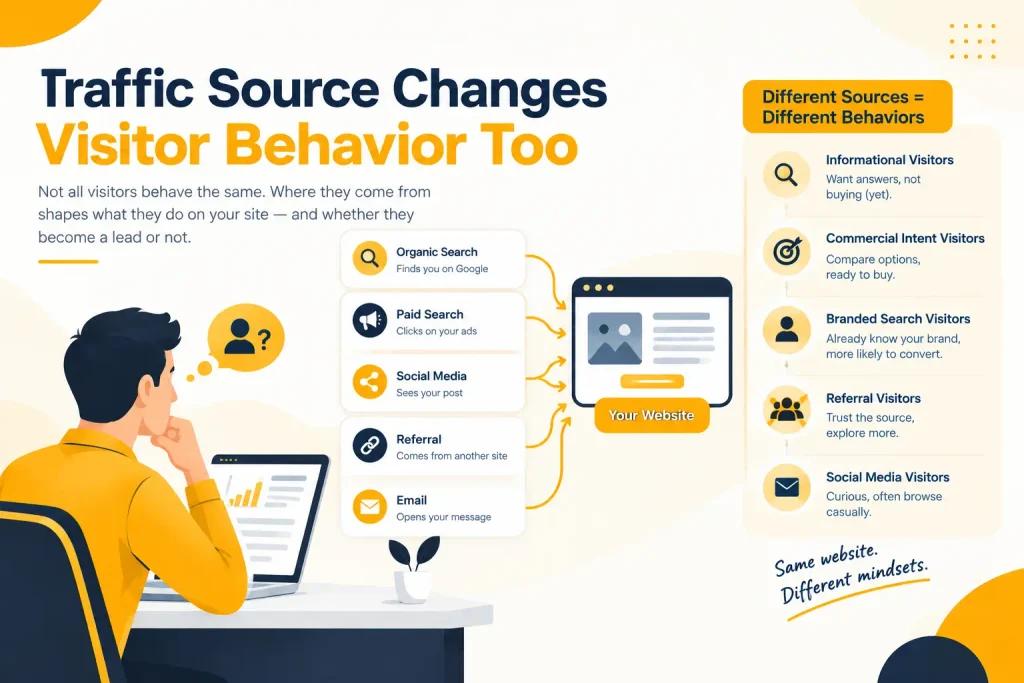
Branded search, people already searching for your company name, behaves differently from non-branded search.
Paid traffic can behave differently from organic. Referral traffic from a directory listing behaves differently from a visitor who found you through a detailed comparison article.
Job seekers, students, competitors, and existing customers also show up in analytics. None of them are the audience a lead-generation page is built for.
Separate visitors before judging the page
Before assuming the website is failing, separate visitors into rough categories: informational researchers, commercial-intent prospects, and traffic that has no real reason to convert.
The pages built for buyers should be judged against buyer behavior, not against total site traffic.
This is where a lot of “traffic but no leads” conversations go wrong from the start. A business owner sees rising sessions in analytics and expects rising inquiries to follow.
If the traffic growth came from informational content, that expectation was never realistic. The question worth asking is not “why isn’t this traffic converting” but “was this traffic ever close to a buying decision?” Those are different diagnoses with different fixes.
A simple way to frame the problem
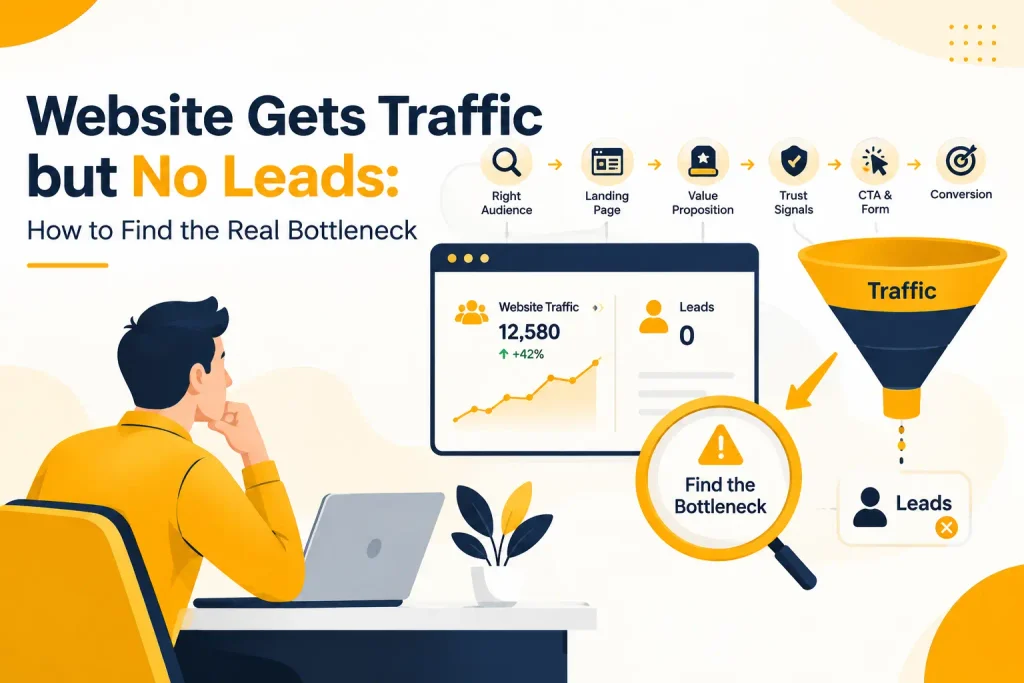
It helps to think of the process as a sequence of stages. A failure at any single stage produces the same visible complaint.
The right visitor reaches the right page, sees a clear value proposition, finds enough trust signals, has a reason to act, sees a relevant CTA, goes through a low-friction process, and becomes a lead that gets followed up properly.
“Traffic but no leads” can mean several different things:
- The wrong visitor reached the page
- The right visitor reached the wrong page
- The value proposition never came across
- Trust was missing at the moment of decision
- The CTA did not match what the visitor was ready to do
- The form itself was the obstacle
- The lead was captured and then never contacted
Each of these has a different fix. That is why generic advice like “improve your website” rarely helps.
How to identify where leads are being lost
Work through the funnel in order. Use behavior at each stage as evidence for where to look next.
Each stage either passes or fails. The stage that fails tells you what to check, not where to start redesigning.
High traffic, low engagement
Visitors leave quickly, scroll very little, or bounce fast.
Check whether the traffic matches the page. If people search “how much does a website cost” and land on a page selling development services, most of them are still researching. They were never going to contact you on that visit.
Reasonable engagement, low CTA interaction
Visitors read the page but rarely click toward contact.
This usually points to the offer or the value proposition, not the traffic. The visitor understood enough to stay, but not enough to see a reason to act now.
CTA clicks, low form completion
Visitors are interested enough to start the process and then abandon it.
This is where form length, unclear next steps, and missing trust signals usually show up.
Form submissions, but poor lead quality
The mechanics are working. The people submitting are not a good match.
This points back to targeting and messaging. The page may be attracting the wrong search intent, even though the conversion process itself works fine.
These patterns are not a rigid formula. A site can have more than one issue at once. The right starting point depends on where the numbers actually break down.
What to check when traffic does not produce leads
Search intent and page-message match
If the keyword someone searched for does not match what the landing page delivers, the mismatch shows up as an early exit.
A visitor who searched “local SEO services” and lands on a broad, generic SEO page has to work harder to see whether you do what they need. Many will leave rather than dig for the answer.
Fixing this is not about adding more keywords to the page. It is about checking what people actually searched to arrive there, using Google Search Console, and comparing that against what the page headline and first paragraph promise.
Weak or unclear offer
A page can be well written and still fail to convert if visitors can’t tell what happens after they contact you.
“Contact us” does not answer that question. A visitor deciding between three similar-looking service providers is looking for a reason to choose one. Vague copy about being experienced or professional does not give them one.
Specific, concrete language usually performs better than general claims. What does the visitor get? What problem does it solve? What is the next step once they reach out? These questions should be answerable within the first screen of the page.
The difference shows up clearly when you compare wording side by side.
“Contact us for SEO services” tells the visitor almost nothing about what happens next.
“Request a technical SEO audit and get a prioritized list of issues affecting your site’s organic performance” tells them what they will receive, what it covers, and what to expect after they submit the form.
The second version gives an action, a deliverable, and a reason to act now instead of later. That kind of specificity is usually a bigger factor in whether someone contacts you than the visual design of the page.
Low trust at the decision point
Trust signals do not automatically increase conversions on their own. But their absence can create hesitation at exactly the moment someone is deciding whether to submit a form.
Reviews, testimonials, case studies, client information, and clear contact details all reduce uncertainty.
If a visitor has read the page, understood the offer, and still does not contact you, missing trust signals near the CTA are worth checking.
CTA problems
A generic CTA button is rarely the whole issue. But it is worth examining in context.
Where does the CTA appear on the page? What action is it actually asking for? Does that action match how ready the visitor is likely to be?
A visitor reading an early-stage educational article is not usually ready for “Request a quote.” A visitor on a detailed service page with pricing information is much closer to that decision.
Matching the CTA to visitor readiness
The CTA should shift depending on where the visitor is in that decision.
Someone reading a beginner guide responds better to a lower-commitment step, such as reading a related article, seeing examples of past work, or downloading a checklist.
Someone comparing options on a pricing or services page is closer to a commercial decision. They respond better to seeing plans, comparing packages, or booking a short consultation.
Someone who has already read the service details and is checking a contact page is usually ready for a direct step, such as requesting a quote, booking a call, or starting a project.
Putting a high-commitment CTA in front of a low-intent visitor, or a low-commitment CTA in front of someone ready to buy, both reduce conversions in different ways.
Form friction
Long forms, unnecessary required fields, and unclear instructions all reduce completion rates.
Session recordings and form analytics can show exactly where people stop typing and leave. If most abandonment happens at a specific field, that field is worth questioning. Does the business genuinely need that information before the first conversation, or can it wait until after contact?
A realistic example of form friction
A web-design agency’s contact form might ask for name, email, phone, company, website, company size, monthly revenue, marketing budget, project budget, number of employees, and a detailed project description, all before the visitor has spoken to anyone.
Some of that information is genuinely useful for qualifying a lead. Very little of it is needed to start a conversation.
Fields like budget range or company size can often move to a follow-up call or a second-step form, once the visitor has already committed to the first, smaller step of getting in touch.
Page speed
A slow-loading page loses visitors before they see the offer, the trust signals, or the CTA at all.
This matters more on mobile, where connection speed is often slower and patience for a slow page is lower. A visitor who searched on their phone and hits a page that takes several seconds to load is likely to leave before the page finishes rendering.
Page-speed tools can show which specific elements are slowing a page down, such as unoptimized images or unnecessary scripts. Fixing those is usually more useful than a general instruction to “make the site faster.”
Technical and mobile issues
A form that is hard to use on a phone, buttons that are difficult to tap, or a layout that breaks on smaller screens can all interrupt conversion regardless of how good the copy is.
These are specific, checkable problems rather than a general “mobile experience” category.
Testing the actual form and CTA on a real phone, not just looking at a desktop preview, usually reveals issues that are easy to miss otherwise.
Broken or incomplete tracking
Sometimes the website is converting reasonably well, and the reported problem is a measurement issue.
Form submissions that are not tagged as conversions, phone calls that are not tracked, or analytics goals that were set up incorrectly can all make a functioning site look like it is failing.
Before making changes to the page, confirm that submitted forms, tracked calls, and completed actions are actually being recorded correctly.
Why this should be checked first
This is worth checking before anything else, because it changes the entire diagnosis.
A business can be receiving phone calls, WhatsApp messages, and emails that never appear in Google Analytics because none of those channels were connected to a conversion goal. In that situation, the website is not the problem. The reporting is.
Submit a test form. Place a test call through any tracked number. Confirm each one shows up as a conversion in analytics before concluding that a page, a CTA, or a form needs to change.
Weak follow-up after the lead is captured
A lead that is never contacted, contacted too slowly, or handled poorly after submission produces the same business outcome as no lead at all: no new client.
If forms are being completed but sales results are not improving, the problem may not be on the website. Response time, follow-up process, and how inquiries get routed internally are worth reviewing before assuming the site itself needs more changes.
Leads, qualified leads, and sales are not the same thing
It helps to separate “no leads” from “leads that don’t turn into customers,” because they point to different problems.
A website conversion, a qualified lead, and a sale are three different stages.
As an illustrative example only, not a benchmark: a hundred visitors might produce ten inquiries, of which six turn out to be a genuine fit for the business, two reach the proposal stage, and one becomes a customer.
If the complaint is “we don’t get leads,” the diagnosis belongs on the website and its traffic.
If the complaint is “we get leads, but they rarely become customers,” the diagnosis usually belongs further down the process: how leads are qualified, how quickly they are contacted, and how the sales conversation is handled.
Treating both situations as the same problem leads to the wrong fix.
Visitors who leave without converting
Not everyone who leaves without contacting you is gone for good. Some visitors need more than one visit before they are ready to act, especially on higher-consideration services.
Retargeting ads can bring back visitors who viewed a service page but did not convert, and an email capture on lower-commitment content, such as a guide or checklist, can keep the conversation open without asking for a full inquiry on the first visit.
This is a lever worth using once the on-page issues above are addressed. Retargeting visitors away from a page with a message mismatch or a broken form just repeats the same drop-off at a higher cost.
What metrics can and cannot tell you
Conversion rate and landing-page conversion rate
Conversion rate shows how many visitors completed a goal, but it does not explain why.
A landing-page conversion rate helps you compare specific pages against each other, but only within a similar type of traffic and intent.
CTA and form metrics
CTA click-through rate shows whether visitors are interested enough to act, separate from whether they complete the form afterward.
Form-start rate versus form-completion rate can isolate whether the problem is attracting attention or finishing the process.
Device-level conversion differences can point to a mobile-specific issue, but only if the traffic mix is otherwise similar between devices.
Bounce rate and Search Console data
A high bounce rate on its own does not prove the landing page is bad. It can be a reason to look closer, but bounce behavior needs to be checked alongside traffic source and search intent before concluding.
The same caution applies to Search Console. Impressions, clicks, and average position describe what happens before someone reaches your site. They do not explain what happens after the click. That is what analytics and conversion tracking are for.
Redesign or optimize?
A full redesign is sometimes the right call, particularly if the site is outdated, difficult to navigate, or built on technology that limits basic tracking and testing.
But a modern-looking website can still fail to generate leads if the underlying issues are about intent match, offer clarity, trust, or form friction rather than visual design.
Before committing to a redesign, run the diagnostic steps above. If the problems trace back to specific, fixable issues, on-page and CRO changes are usually faster and cheaper to test than a full rebuild.
If the site’s structure, content model, or technical foundation genuinely cannot support the fixes needed, a redesign becomes a more reasonable option.
A practical order of operations
- Confirm tracking is accurate before changing anything else. If conversions are not being measured correctly, every other decision is based on bad data.
- Check traffic quality and search intent against the pages receiving that traffic.
- Review whether the landing page message matches what visitors expected when they clicked.
- Look at the offer and value proposition. Is it specific enough to act on?
- Check trust signals near the point of decision.
- Review the CTA: placement, wording, and whether it matches visitor readiness.
- Check the form for unnecessary friction.
- Test technical performance and mobile usability directly.
- Once changes are made, test them and compare results using the same conversion metrics.
- Review how leads are followed up once they arrive.
- Once on-page issues are fixed, consider retargeting to bring back visitors who didn’t convert on their first visit.
This order is not arbitrary. Fixing a CTA on a page that is attracting the wrong visitors will not move the numbers much. Measurement and intent match usually need to be right before smaller conversion tweaks matter.
FAQs
Why is my website getting traffic but no leads?
Usually because one part of the process between the click and the completed form is not working: the traffic does not match the offer, the page does not meet visitor expectations, trust is weak, the CTA or form creates friction, or leads are not followed up after they arrive.
What is a good website conversion rate?
There is no single universal number. Conversion rates vary by industry, traffic source, search intent, device, and the type of action being requested.
Comparing a page against its own past performance, or against pages targeting similar intent, is more useful than chasing an external benchmark.
Should I redesign my website or optimize the current one?
Start with diagnosis. If the issues are about message match, offer clarity, trust, or form friction, targeted optimization is usually faster to test.
A redesign is more justified when the site’s technical foundation or structure cannot support the needed changes.
How long does it take to improve conversion rate?
This depends mainly on two things: how much traffic the page gets and how many separate issues are affecting it.
A page with high traffic can show a meaningful before-and-after comparison within a few weeks of a change, because enough visitors pass through to make the difference clear. A lower-traffic page takes longer to reach a reliable comparison, simply because fewer visitors means fewer data points.
If several issues are stacked, such as broken tracking, a message mismatch, and a long form, fixing them one at a time and measuring after each change takes longer than fixing them together, but it shows which change actually mattered.
How can I get more leads without increasing traffic?
Improve what happens after the visitor arrives. Better intent match, a clearer offer, stronger trust signals near the CTA, and a simpler form can all increase conversions from the traffic you already have.
Can SEO traffic generate leads if the keywords are informational?
Sometimes, but not at the same rate as commercial keywords, and that is expected rather than a failure.
Informational content can still produce leads if it guides an interested reader toward a relevant next step, such as a related service page. But judging it against the conversion rate of a commercial page will make it look worse than it actually is.
Why do I get form submissions but very few qualified leads?
This usually points to a mismatch between the keywords or content attracting visitors and the audience the business actually serves, rather than a problem with the form itself.
Check what people searched for before submitting, and whether the page set accurate expectations about who the service is for.
Where to go from here
If traffic is growing but leads are not, check the pages receiving that traffic before spending more on acquisition.
Look at what visitors searched for, what they saw after clicking, and where they stopped. That usually gives a clearer starting point than trying to get more visitors to a page that is not converting the ones it already has.
Softage Solutions offers a structured website conversion review that identifies exactly where the process is breaking down, using your own analytics and search data rather than generic assumptions.