
Web development frameworks are collections of code, tools and rules that help developers build websites and web applications without starting from zero. They handle common jobs like routing, forms, data access and page structure, so a team can spend its time on what makes the project different.
The choice matters for business owners as well as developers. A framework affects how long a project takes, how easy it is to maintain, which developers you can hire, and how well search engines can read your pages. This guide explains the main types, compares the common options in plain language and shows how to choose based on your own requirements.
What Is a Web Development Framework?
A web development framework is a structured set of tools and conventions for building web software. It gives developers a ready made foundation. They write the parts that belong to their project, such as pricing logic, a customer dashboard or a product page.
Think of building a house. You could cut every board and mix every bucket of concrete yourself. Or you could start from a prepared plan, standard parts and a known building order. A framework is the second approach.
A framework usually provides:
- A project structure, so files live in predictable places.
- Rules for how code should be organized.
- Built-in features for common tasks.
- Command line tools that create and run projects.
- Documentation and a community that knows the same conventions.
Developers use a framework by installing it, following its structure and writing their own code inside it. The framework often “calls” their code at the right moment, such as when a visitor opens a page or submits a form. Writing everything from scratch gives total control, but it is slow and each team invents its own habits. A framework trades some freedom for speed and consistency.
Frameworks are also called web frameworks or web application frameworks. Some are built for the part users see. Others are built for the server. A few cover both.
Why Use a Web Development Framework?
Teams use frameworks for practical reasons. None of them is automatic, and each depends on how well the framework is used.
- Reusable patterns. Common problems such as login, page routing, and form handling already have an accepted solution.
- Shared structure. A new developer can open the project and find things quickly because the layout follows the framework’s conventions.
- Built-in capabilities. Many frameworks include routing, data handling, templates and testing tools, so fewer outside parts are needed.
- Security support. Some frameworks include protection against common problems such as cross-site request forgery. This helps, but it does not replace secure coding, updates, and review.
- Component systems. Frontend frameworks let developers build a button or a menu once and reuse it across pages.
- Team development. When everyone follows the same conventions, several developers can work in the same codebase with fewer conflicts.
- Maintenance. A well-known framework has documentation, updates, and developers who understand it.
A framework does not make a website fast, safe, or good on its own. A poorly built project on a popular framework can still be slow and insecure.
Main Purpose of a Web Development Framework
The main purpose is to give developers a dependable structure and a set of common tools, so web projects are built in a consistent way.
Depending on the framework, that can include:
- Structure and conventions. Where code goes and how parts connect.
- Routing. Matching a web address to the code that should answer it.
- Request handling. Reading what a visitor or another system sends and returning a response.
- Reusable components. Pieces of interface that can appear in many places.
- State handling. Tracking information such as what is in a shopping cart.
- Database interaction. Reading and saving data without writing everything by hand.
- Libraries and tools. Helpers for forms, authentication, file handling, and more.
- Testing support. Ways to check that code still works after a change.
Frameworks differ a lot. Some include nearly everything. Others provide a small core and expect you to add the rest. Compare each option by what it includes, not by the label “framework”.
Frontend Frameworks vs Backend Frameworks
The frontend is what the visitor sees and uses in the browser. The backend runs on a server and works behind the scenes. Frameworks exist for both sides, and some projects use one of each.
A third group, often called full stack frameworks, covers both sides in one system. Next.js, for example, can render pages on a server and also run server code.
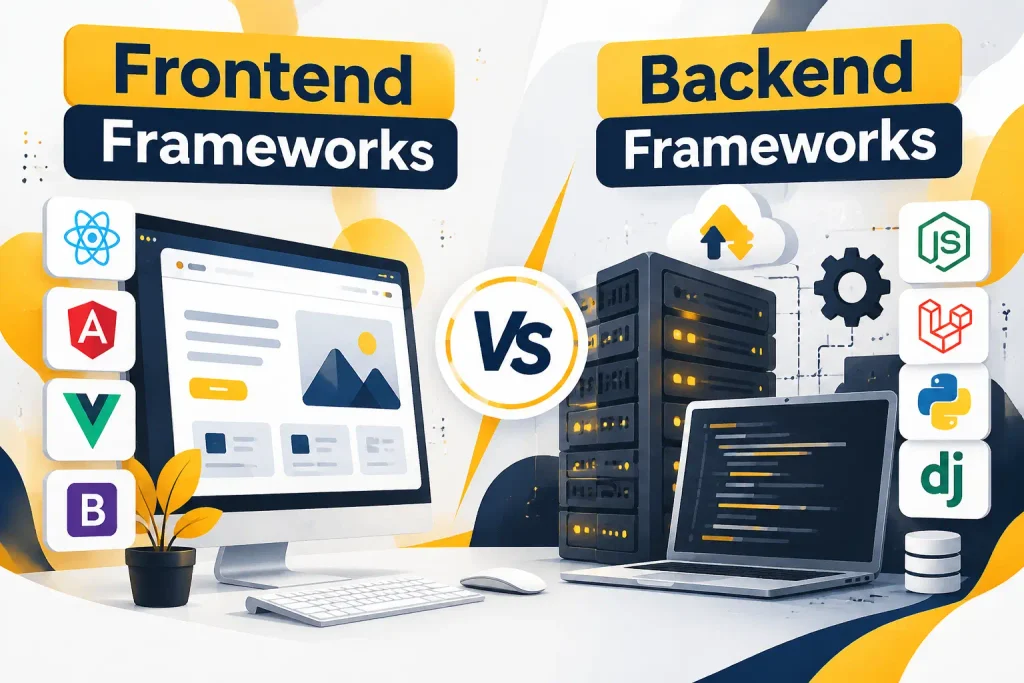
Frontend Frameworks
Frontend development covers the user interface, components, browser interaction, and client-side behavior. Depending on the tool, it also covers rendering, page routing, and state management. Rendering means turning code and data into the page a visitor sees.
Next.js
Next.js is a web framework built on top of React. React handles the interface. Next.js adds routing, data loading, and server features, plus choices about how pages are rendered. Pages can be generated ahead of time, built on the server for each request, or rendered in the browser, depending on the setup.
Businesses consider Next.js for marketing sites, e-commerce storefronts, dashboards, and web applications where one codebase should cover both pages and server logic. It needs a team that knows React and a hosting plan that supports its server features. Check the official Next.js documentation for current capabilities.
Astro
Astro is a web framework focused on content-driven websites and performance. It is a good match for blogs, documentation, marketing sites, and company sites where most pages are mostly text and images.
Astro can generate pages ahead of time and also supports server rendering. It uses an islands approach, where only the interactive parts of a page send JavaScript to the browser. It also lets developers use components from other tools, including React, Vue, and Svelte. Astro is less natural for a large app with heavy interaction on every screen.
TanStack
TanStack is a collection of libraries and tools, not a single conventional framework. Developers pick the pieces they need. Common examples are:
- TanStack Query for fetching and caching server data in the interface.
- TanStack Router for routing with strong support for type checking.
- TanStack Table for building data tables.
TanStack also offers a full stack framework called TanStack Start, built around its router. Check the official TanStack documentation for its current status. The collection suits teams that want control over their stack and are comfortable choosing and connecting tools.
React
React is a JavaScript library for building user interfaces. It is not a full web framework. React focuses on components, which are small reusable pieces of the interface, and on updating the screen when data changes. It does not decide how you handle routing, data loading on the server or project layout. Teams add other tools for those, or use a React-based framework such as Next.js.
React is widely used, partly because it has a very large ecosystem of tools and developers. That makes it a reasonable choice for projects that need a component-based interface and many third-party packages. Popularity alone is not a reason to choose it.
Vue
Vue is a JavaScript framework for building user interfaces. It uses components and a template style that many developers find easy to read. Vue can be added to one page of an existing site or used to build a full single-page application. Its related tools cover routing and state handling.
Developers often choose Vue for its gentle learning curve and clear documentation. It fits small to mid-sized applications, admin panels, and interfaces added to existing websites. Nuxt is a framework built on Vue that adds server rendering and routing.
Angular
Angular is a web application framework maintained by Google. It uses TypeScript and gives teams a complete, opinionated structure: routing, forms, dependency injection, and testing tools come as part of the platform.
That structure suits large applications and big teams, where shared rules prevent every developer from solving the same problem differently. Common business uses include internal systems, large dashboards, and long-lived enterprise applications. The cost is a steeper learning curve and more setup than lighter tools.
Svelte
Svelte is a compiler-based UI framework. Instead of doing most of its work in the browser, Svelte converts components into plain JavaScript when the project is built. Components are written in a simple file format that keeps markup, logic, and styles close together.
Teams choose Svelte for small bundles and a clean writing style. It suits interactive interfaces, widgets, and mid-sized web applications. SvelteKit is the framework built on Svelte that adds routing and server features. Its ecosystem is smaller than React’s, which can matter when you need many ready-made packages or a large hiring pool.
Backend Frameworks
Backend development covers server-side logic, APIs, authentication, database communication, business logic, request handling, and application services. An API is a way for software, such as your frontend or a mobile app, to ask the server for data or actions.
Express.js with Node.js
Node.js and Express.js are two different things. Node.js is a JavaScript runtime. It lets JavaScript run outside the browser, for example on a server. Express.js is a web framework for Node.js. It adds routing, middleware, and request handling on top of what Node.js provides.
Express is minimal. It gives you a small core and leaves most choices to you. That makes it popular for APIs and services, and for teams that already write JavaScript on the frontend. The trade-off is that you must choose and connect your own tools for things like authentication and database access.
Django
Django is a Python web framework. It includes many tools in one package: database access through an object-relational mapper, an automatically generated admin area, user authentication, forms, and security features. This “everything included” approach helps teams build database-driven applications quickly.
Django is used for business applications, content platforms, APIs, and data-heavy products. Python is also strong in data work, so Django can be a practical choice when an application sits close to data processing.
Laravel
Laravel is a PHP web framework. It follows the MVC approach, which separates data, display, and control logic into different parts of the code. It includes routing, a database layer called Eloquent, authentication tools, queues, and a command line tool called Artisan.
Many businesses use Laravel for custom web applications, customer portals, and e-commerce backends. PHP also has a long history in web hosting, so hosting options are plentiful. Because PHP is a language and Laravel is the framework, the two should not be treated as the same thing.
Spring and Spring Boot
Spring is a large Java application framework ecosystem. It covers many needs, including web applications, security, data access and messaging. Spring Boot is the part most teams start with. It sets up a Spring application with sensible defaults and automatic configuration, so developers can get a working service running quickly.
Spring is common in enterprise applications, APIs and large business systems, especially in organizations that already use Java. It tends to need more planning and developer experience than lighter tools.
Web Development Frameworks Compared
| Framework or technology | Category | Main technology | Common uses | Best fit |
|---|---|---|---|---|
| Next.js | Full stack web framework | JavaScript or TypeScript, React | Marketing sites, storefronts, web apps | Teams already using React |
| Astro | Web framework | JavaScript or TypeScript | Content sites, blogs, documentation | Sites where content comes first |
| TanStack | Collection of libraries | JavaScript or TypeScript | Data fetching, routing, tables | Teams that choose their own stack |
| React | UI library | JavaScript or TypeScript | Component-based interfaces | Interface-heavy projects |
| Vue | Frontend framework | JavaScript or TypeScript | Interfaces, admin panels | Small to mid-sized apps |
| Angular | Web application framework | TypeScript | Large business applications | Big teams, long-lived apps |
| Svelte | Compiler-based UI framework | JavaScript or TypeScript | Interactive interfaces | Small bundles, clean code |
| Express.js | Backend web framework | JavaScript on Node.js | APIs, services | Flexible, minimal backends |
| Django | Backend web framework | Python | Database-driven apps, APIs | Fast builds with many built-in features |
| Laravel | Backend web framework | PHP | Custom web apps, portals | PHP teams, common hosting |
| Spring Boot | Java application framework | Java | Enterprise systems, APIs | Large Java-based organizations |
No row in this table is a ranking. The right choice depends on project requirements, team skills, budget, existing technology, application complexity, performance and security needs, maintenance and long-term plans.
Web Development Framework Pros and Cons
Potential advantages
- Structured development with predictable file layout.
- Reusable code and common patterns.
- Development tools such as command line helpers and testing support.
- Community resources, tutorials, and documentation.
- Easier teamwork when everyone follows the same conventions.
- A large supply of existing packages and third-party connections.
Potential disadvantages
- A learning curve, especially for large frameworks.
- Framework-specific conventions that new developers must learn.
- Dependency management, since frameworks pull in many packages that need updates.
- Version changes that can force rework.
- Extra complexity on small projects.
- Migration challenges if you later change frameworks.
- Slow pages caused by poor use, not by the framework itself.
- Reliance on third-party packages that may lose support.
A framework is a tool. It helps when the project matches what the tool is built for.
Framework vs Programming Language
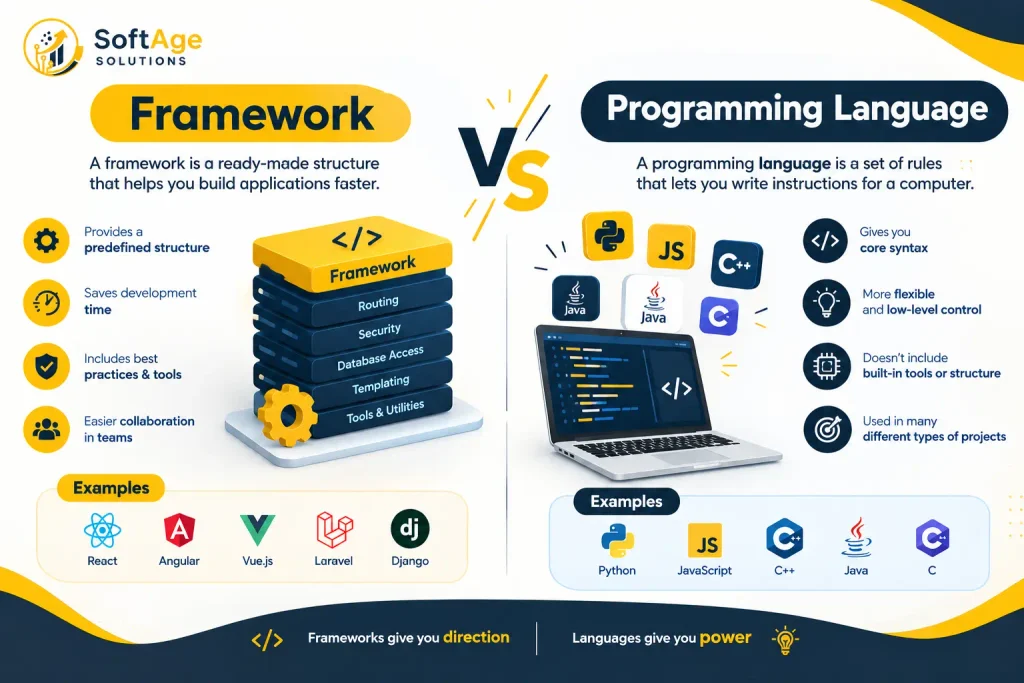
These terms are often confused because people use them loosely. Here is how they differ.
| Term | What it means | Examples |
|---|---|---|
| Programming language | The language developers write code in | JavaScript, PHP, Java, Python |
| Framework | A structure and set of tools that guides how an application is built | Django, Laravel, Angular, Next.js |
| Library | A set of reusable code that your own code calls to do specific jobs | React, depending on how it is used |
| Runtime | The environment that runs code | Node.js |
| Development tool | Software used to write or manage code | Visual Studio Code |
A language is the vocabulary. A framework is a structured way of building with it. A library is a toolbox you reach into when needed. A runtime is where the code runs. A code editor is where you type it.
The line between library and framework can blur. A common way to tell them apart is control. With a library, your code decides when to call it. With a framework, the framework often decides when to call your code. React is usually called a library for this reason, even though people casually group it with frameworks.
How Do I Identify a Web Framework?
Look for these signs:
- Official documentation. The project describes itself, and you can read how it is meant to be used.
- Project structure. It expects a certain folder layout.
- Routing. It decides how web addresses map to code.
- Request handling. It manages incoming requests and responses.
- Components or templates. It defines how pages or interfaces are built.
- Command line tools. It can create, run, and build projects.
- Middleware. It lets you add steps that run before or after a request.
- Rendering. It controls how pages are produced.
- Dependencies and conventions. It brings a set of packages and rules with it.
To separate a framework from other technologies, ask a simple question about each one:
- Language: Is it what code is written in? Then it is a language.
- Library: Does it do one job when you call it? Then it is likely a library.
- Runtime: Does it run code? Then it is a runtime.
- Editor or IDE: Do you type code in it? Then it is a tool.
- CSS toolkit: Does it supply styles and interface pieces? Then it is a CSS or UI framework, like Bootstrap.
How to Choose the Right Web Development Framework
Do not choose a framework because it is popular. Choose it because it fits the work. Work through these questions.
Project requirements. What are you building? A brochure site, a store, a booking system, and a customer portal have different needs.
Development team. What does your team already know? A skilled PHP team may deliver faster with Laravel than with a framework they are learning.
Performance. How fast must pages load, and how many visitors do you expect? Many frameworks can meet normal needs. Poor implementation is a bigger risk than the framework itself.
Security. Which controls does the project need, such as user accounts, payments, or personal data? Check what the framework provides and what your team must add.
Project complexity. Is it a simple website or a complex application? Lightweight tools suit simple needs. Structured frameworks suit complex ones.
Maintenance. Who will update it in two years? Check how often the framework releases updates and how it handles older versions.
Community and documentation. Is the official documentation clear and current? Are there developers who can help?
Ecosystem. Are the packages and third-party connections you need available and maintained?
Hosting and deployment. Does the framework run on the infrastructure you plan to use?
Long term needs. Will you add features, users, or other systems later?
If these answers are unclear, a short planning phase with a developer is usually cheaper than rebuilding later.
Which Framework Is Suitable for Different Web Projects?
No framework is always best for a category. These notes show what to consider.
- Business and corporate websites. Content, speed, and easy editing matter most. Astro, Next.js, or a content management system can fit, depending on who edits content.
- E-commerce websites. Product catalogs, checkout, payment security and search visibility matter. Evaluate how the framework connects to your store platform and payment provider.
- SaaS applications. Accounts, billing, permissions and fast iteration matter. Django, Laravel, Next.js with a separate backend, and Spring Boot are all used.
- Dashboards. Data tables, charts, and filtering matter. Look at React or Angular based options and tools like TanStack Table.
- Customer portals. Secure login and role-based access matter. Laravel, Django, and Spring Boot all provide solid starting features.
- APIs. Clear structure, authentication, and documentation matter. Express, Django, and Spring Boot are common starting points.
- Enterprise applications. Long life, large teams, and compliance matter. Angular and Spring Boot are often considered.
- Content heavy websites. Fast-loading pages and good crawlability matter. Astro and Next.js are common options.
- Custom web applications. The requirements decide. Team skill and maintenance usually matter most.
Web Development Frameworks and SEO
A framework does not give a site better search results by itself. The implementation decides that. Still, framework choices affect several technical SEO areas.
- Rendering. Pages built on the server or ahead of time give search engines complete HTML right away. Pages rendered only in the browser depend on search engines running JavaScript. Google can process JavaScript, but it adds a step and can cause problems if done badly. Google Search Central has guidance on this.
- Crawlability. Search engines need links they can follow and pages they can reach.
- Page structure. Clear headings, text and markup help readers and search engines understand a page.
- Metadata. Each page needs a unique title and description. Check that the framework lets you set them per page.
- Canonical URLs. Duplicate pages need clear canonical tags so search engines know the preferred version.
- Internal linking. Navigation and links should be real links in the page code.
- Structured data. Markup that describes products, articles or organizations should be added correctly.
- Page performance. Heavy JavaScript can slow pages. Review image handling, scripts and loading behavior.
- URL management. Addresses should be clean, stable and free of accidental duplicates.
- Image handling. Check that images are sized correctly and have useful alt text.
Treat SEO as part of the build from the start. A technical review during planning is easier than fixing problems after launch. Our technical SEO work covers crawling, rendering, and site structure, and our on-page SEO work covers titles, headings and page content. For readers building from scratch, content writing also matters, since a framework can display content but cannot create it. Once a site is live, off page SEO and local SEO help it reach a wider audience.
Web Development Frameworks and Business Applications
If you are not a developer, these are the business points a framework choice touches.
- Planning. Ask the team why they recommend a framework and what the alternatives were.
- Features. Some frameworks include features that others require you to build or buy.
- Third party connections. Payment tools, CRMs and email platforms may have ready made packages for some frameworks and not others.
- Security. Ask how updates, user data and access control will be handled.
- Maintenance. Frameworks need regular updates. Budget for them.
- Performance and user experience. Slow or confusing pages cost customers. Ask how performance will be tested.
- Future development. Make sure adding features later will not mean a rebuild.
- Cost. A common framework can lower development cost because developers are easier to find, but rare skills can raise it. Cost depends on scope more than on framework name.
- Team requirements. Ask whether you will need in-house developers or an outside team.
When a Framework May Not Be Necessary
Frameworks are not required for every project.
- A simple static website with a few pages can often be built with plain HTML, CSS and a little JavaScript.
- A small project may do better with a simpler tool or a content management system.
- Existing systems can decide the technology. If your company already runs on Java or PHP, that usually shapes the choice.
- A framework can add complexity, update work and extra code the project never uses.
Choosing the simplest tool that meets your needs is a sound technical decision.
How SoftAge Solutions Helps With Web Development
SoftAge Solutions provides web development and SEO related services. For projects like those described here, the useful help usually falls into these areas:
- Website development and custom web development.
- Web application development.
- Frontend and backend development.
- Technical planning and framework selection based on your requirements.
- Website maintenance.
We start by understanding what you are building, who will use it, and how you’ll maintain it. The framework discussion follows from those answers. Because technical SEO affects how a site is built, we also consider search visibility during planning, not after launch. We do not promise specific rankings, traffic, performance or security results, because they depend on implementation and many other factors.
FAQs
Is PHP a web framework?
No. PHP is a programming language used for server side development. Laravel, Symfony and CodeIgniter are PHP frameworks.
Is Java a web framework?
No. Java is a programming language. Spring and Spring Boot are Java frameworks developers use.
Is JavaScript a web framework?
No. JavaScript is a programming language. React, Vue, Angular, Svelte, and Express.js are built with or for JavaScript.
Is Visual Studio Code a framework?
No. Visual Studio Code is a code editor. Developers use it to write code in many languages and frameworks.
Is Bootstrap a framework or a library?
Bootstrap is usually described as a frontend CSS and UI framework or toolkit. It provides ready made styles and interface components, plus some JavaScript. It does not manage routing or server logic.
Which framework is better for web development?
There is no single better framework. The right one depends on your project, team, budget, performance needs, and long-term plans. Compare options against those requirements, not against a popularity list.
Is React a framework or a library?
React describes itself as a library for building user interfaces. Many teams use frameworks such as Next.js to get routing and server features.
Is Node.js a framework?
No. Node.js is a JavaScript runtime. Express.js is a framework that runs on it.
What is a full stack framework?
A full stack framework supports both frontend and backend work in one system. Next.js and SvelteKit are examples.
Do I need a framework to build a website?
Not always. A small static site can be built without one. A larger site or an application usually benefits from the structure a framework gives.
What is the most popular web development framework?
Popularity depends on the survey, the year, and the group asked. Check recent developer surveys, such as the Stack Overflow Developer Survey, instead of relying on a single claim. Popularity is also a weak guide to what fits your project.
Conclusion
Web development frameworks give teams structure, reusable tools and shared conventions. Frontend frameworks handle what visitors see. Backend frameworks handle what happens on the server. Libraries, runtimes, languages and code editors are separate things, and keeping them apart makes every conversation about frameworks clearer.
Start from the project, the team and the long term plan. Then pick the framework that fits, or decide that a simpler approach is enough. If you want help with that decision, discuss your web development project with SoftAge Solutions, and we can talk through your requirements and options.